How we run a mobile app studio with Grok Bot
Inside NaviStack’s agent team for research, app growth, monitoring, and code handoffs, with a workflow you can adapt.

Research method and disclosure
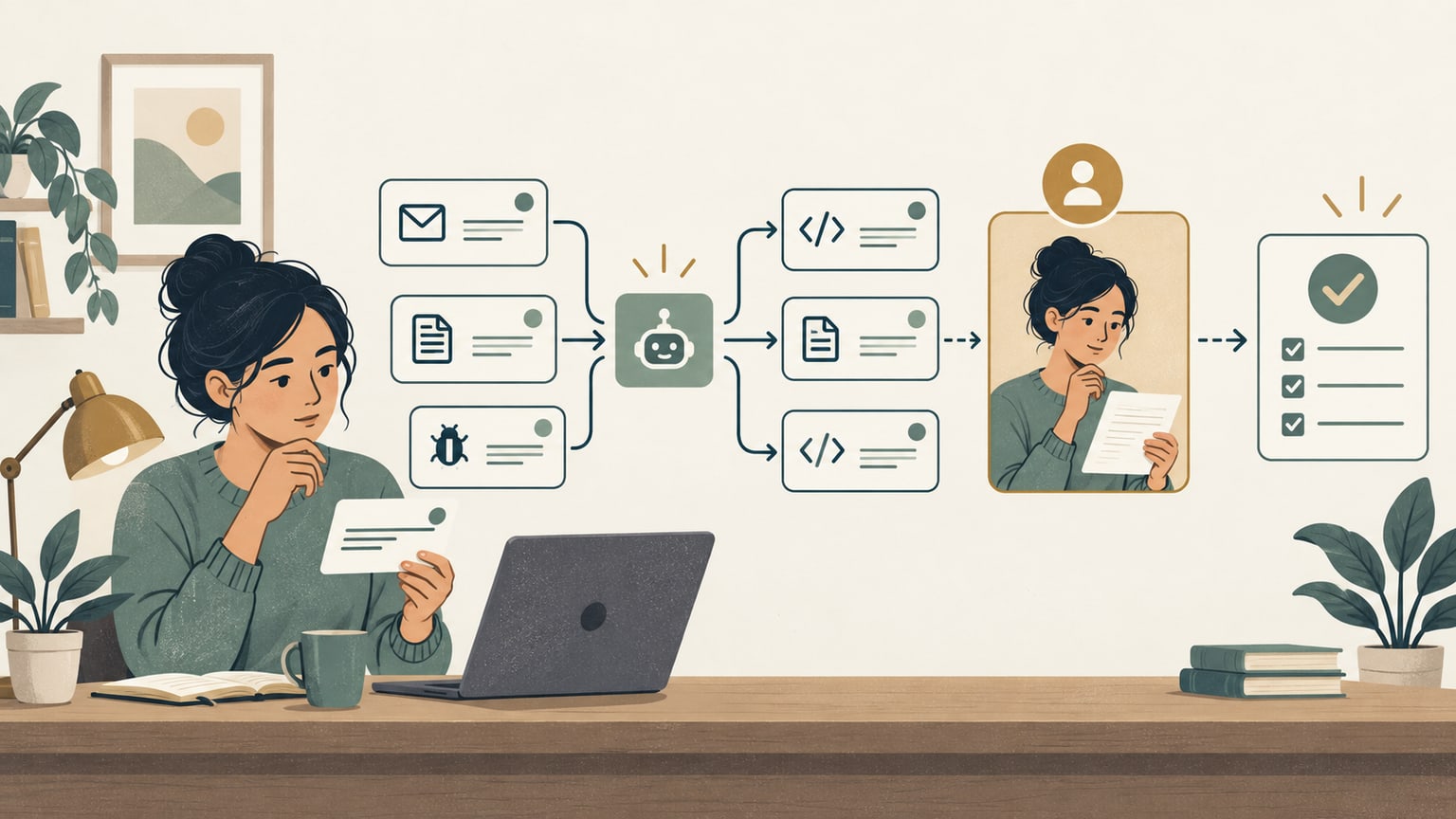
An account of NaviStack's operating setup as of November 6, 2026, based on the founder's context pack, Notion Knowledge Base, project playbook, and research records. General product behavior was checked against current official Grok Bot documentation. The practical scenarios and starter brief are illustrative adaptations, not reports of product-specific outcomes; no productivity or revenue benchmark is claimed. The cover is an AI-generated editorial illustration, not a screenshot of Grok Bot.
The closing link is NaviStack's Grok Bot referral link.
At NaviStack, we use Grok Bot to give recurring work an owner. One agent checks production health, another prepares creator outreach, and others handle growth research, partnerships, and planning. A CEO agent coordinates them and brings us the decisions that need our attention.
Running a mobile app studio involves much more than writing code. There are listings to follow up on, product changes to review, creators to contact, and new ideas to investigate. This is how we've organized that work, with practical examples you can adapt to your own studio. The examples below illustrate the process rather than report results for a particular product.
TL;DR
| Your question | How we handle it |
|---|---|
| What does Grok Bot do for us? | Research, monitoring, drafts, planning, and handoffs between specialists. |
| Who coordinates the work? | A CEO agent briefs us and routes tasks; each specialist owns a defined job. |
| Where does context live? | Notion holds our plans, decisions, research, and task boards. |
| What stays with us? | Build decisions, code merges, deal terms, and most external sends. Limited exceptions are explicit. |
| How should you start? | Give one agent a recurring job, review its first output, then schedule the process once it works. |
Why Grok Bot fits this work
Grok Bot lets you create persistent agents that work across connected tools and websites. The agents on your account share a cloud computer, including its files and signed-in sessions, and can pass work to one another. That combination supports the ongoing research and coordination our studio needs. Grok Bot overview.
For us, the useful unit of work is something like “maintain the directory outreach queue for our app.” That job has context: which listings exist, which pitches need review, which replies have arrived, and what should happen next. Giving it an owner means the next task can build on that record.
Grok Bot handles much of the coordination. Cursor, Codex, and Claude Code remain part of our coding stack. Notion holds the shared operating record, and we review the work that needs a human decision.
That division is worth deciding before you create agents. Pick work you can describe clearly and inspect when it's done. You'll have a much easier time improving a directory shortlist than evaluating an instruction to “grow the company.”
Our team starts with a CEO agent
The CEO agent is our main point of contact. It receives requests, hands work to specialists, maintains our Notion headquarters, and sends a weekday morning brief. The brief starts with what needs us: a decision, an approval, or a blocker.
Calling it “CEO” describes its coordinating role. We still set priorities and make the final business decisions.
Here are the main responsibilities across the team:
| Agent or group | What it owns | What comes back for review |
|---|---|---|
| CEO | Coordination, daily brief, and upkeep of CEO HQ | Priority conflicts, blockers, and decisions |
| Sam, our daily planner | Due tasks, upcoming work, and coding handoffs | Draft code changes and unclear priorities |
| Odie, our inbox agent | Reading and routing incoming studio email | Messages that need the responsible specialist or us |
| Product growth agents | SEO, directory opportunities, App Store optimization, and conversion work | Outreach drafts, proposed tests, and code changes |
| Production health agent | Production checks and investigation of problems | Fix proposals, draft pull requests, and decisions about limits or plans |
| Creator and app partnership agents | Prospect research, correspondence preparation, and follow-ups | Offers, deal terms, and messages requiring approval |
| R&D | Demand research, product plans, and reasons to continue, park, or stop | A proposal we can challenge before approving a build |
These roles have boundaries. Odie routes an email to its owner; it doesn't approve the reply. The agent finding creators to promote our apps has a different job from the one researching partnerships with app owners.
You can start much smaller. Add a specialist when a recurring workload has enough distinct context to justify one. A CEO agent becomes useful when coordinating those specialists is itself taking your attention.
Notion makes the handoffs usable
Our Notion home is called CEO HQ. It gives agents somewhere to read the current plan and leave work another agent can pick up.
The core pieces are straightforward:
- Agent Roster: who owns each job and when it runs.
- Growth Board: initiatives, priorities, owners, and progress.
- Decisions & Open Questions: what has been settled and what still needs us.
- Project control rooms: a project's brief, specifications, tasks, and supporting links.
- Knowledge Base: research and saved resources that agents can use again.
Saved links need context before they can guide work. Our GitHub Stars Library contains 36 repositories in the November 6 snapshot. Each is tagged by category and includes notes on what it's useful for and when to use it. An agent can look for an App Store submission tool or an engineering skill without treating every saved repository as relevant.
We do something similar with X bookmarks: organize them by topic, record the takeaway, and distinguish dated news from reusable ideas. Saving a claim doesn't verify it, so agents still need to check the original source before relying on it.
For a practical example, imagine finding a useful guide to app-store conversion. An agent could summarize its recommendations, compare them with the current product brief, and propose separate tasks for screenshot research, review analysis, and a listing-copy test. Each task should include its source, owner, and next action.
Keep proposals separate from approved work. If listing changes are paused during an experiment, record that dependency on the task. A useful research summary should help the next agent understand what can start now and what needs to wait.
The daily brief keeps us focused on decisions
Our schedules use Asia/Bangkok. On weekdays, Sam prepares the standup around 8:00 a.m., covering due work and tasks that need an early start. The CEO brief follows around 8:30.
Other jobs run at a cadence that fits their purpose. Odie checks the inbox roughly hourly. Our production health agent runs twice daily. Pending directory listings get a Monday follow-up, and the CEO reviews the Growth Board on Friday.
The health agent's notification rule is specific: report a new issue, a worsening issue, a recovery, or something that needs a decision. Repeating an unchanged status would give us more to read without changing what we need to do.
For your own brief, ask for the decision first, followed by the evidence and a recommended next step. A link to a draft or a task is much more useful than “outreach is progressing.” It lets you inspect the work and move it forward.
A useful handoff ends in something you can review
When we give the CEO a task, it can send a brief to the responsible agent. That agent works in its own conversation, saves the output, and reports back. The CEO brings unresolved decisions into the brief.
Consider an illustrative directory outreach task. An agent prepares three email drafts: one is ready for review, another depends on correcting a store description, and the third refers to a feature that hasn't shipped yet.
The useful handoff includes those dependencies beside each draft. “Three drafts prepared” tells us how much output exists; the status of each draft tells us which action we can take. The feature-dependent message should stay blocked until the release is verified.
We use a similar approach for code. A task brief explains the goal, relevant files or prior work, scope, acceptance criteria, and how to check the result. Cursor cloud agents can turn that into a draft pull request: a proposed code change held for review. Codex handles local repository work on our development machine, and Claude Code is also part of our development and design workflow.
The intended path is a draft pull request, a preview, review, then a founder-approved merge. Reports should include a plain-language explanation of what changed and the outcome. Grok Bot helps move the task through that process; a proposed fix still needs inspection before it reaches users.
Research helps us decide what to park
We also use agents before committing to a build. Our project process starts with demand research, competitor analysis, and customer complaints. The CEO checks whether the idea deserves more work. A plan then gets reviewed by an agent other than its author, followed by a discussion with us.
Suppose we're considering a meal-planning feature. A research agent could examine competing apps, collect recurring complaints from public reviews, and separate evidence of demand from assumptions. Its output should include source links, open questions, and a recommendation about what to investigate next.
A feature inside an existing app and a standalone meal-planning app are different proposals. If the scope changes, the plan needs another review: who would use it, how they would find it, and what we'd need to maintain could all change.
In this example, a promising research brief would still stop short of authorizing a build. We'd resolve the open questions and compare the proposal with current priorities before committing development time.
This is a useful job for an agent team: make the evidence and tradeoffs clear enough that you can choose to wait. Our playbook limits active builds to one or two projects. Research can prepare the next decision without turning every interesting idea into another unfinished product.
The rules need maintenance too
Some of the most useful parts of our process came from mistakes.
Approvals became ambiguous when agents relayed them. We now require direct approval from the founder in the conversation of the agent that owns the action. Another agent relaying an approval doesn't count. The CEO can coordinate a handoff, but that handoff doesn't grant new permission.
A draft-only rule didn't prevent every code mistake. We had a cloud coding agent push to the main branch during a directory-badge task. That is a failure of the intended workflow. For your setup, use repository permissions and review requirements to back up written instructions wherever possible.
The roster and schedules drifted. Some agents were working before their roster entries caught up. We also had schedules split between Podgorica and Bangkok. Updating a document is only part of fixing that; the saved routines need checking too.
Outreach has explicit exceptions. Most agents prepare drafts for approval. Our App Partnerships agent has standing permission for daily cold openers. Replies in active deal conversations go through a CEO check, then we send them. Creator outreach requires approval in its own agent conversation. Each permission belongs to a particular workflow.
Grok's documentation says bots on an account share files, browser sessions, and app logins. A specialist's job description is an organizational boundary, not a separate account environment. Give the system access deliberately, and keep credentials out of ordinary briefs and Notion pages. Shared-computer model.
Our review queue remains a constraint. More agents can prepare more work than we can sensibly review. Keeping priorities narrow and parking competing projects is part of running the system.
How to start with your first Grok Bot
Start with one recurring task whose output you already understand. A directory shortlist, a research brief, or an inbox-routing report gives you something concrete to judge. Choose a task that is worth repeating and has a clear stopping point.
1. Set up one agent and its source material
Use Grok's current setup guide to check plan eligibility, install the app, and sign in. Give the first bot one primary job. Connect the tools it needs and provide a small set of current source documents. Grok Bot setup guide.
For an app growth task, that might be a product description, supported platforms, existing listings, approved claims, and a place to save findings. Ask the bot to summarize its assignment and limits so you can catch misunderstandings before it starts.
2. Give it a brief with a finish line
Here is a starter brief adapted from our directory workflow. It's an example to customize, not a transcript of an actual run:
Your job is to maintain a directory opportunity shortlist for our app.
Read the product brief and existing listings in the Notion page we provide. Find up to five relevant opportunities that aren't already listed or in progress.
For each opportunity, save the source URL, why the app fits, submission requirements, any stated cost, and the next action. Distinguish verified facts from assumptions. If a source is unavailable, record that limitation.
Save the shortlist in the designated Notion page and prepare any suggested outreach as drafts. Do not contact anyone, submit listings, pay fees, or change the website.
Finish with links to the results, your recommended first action, and anything that needs our decision. Run this once; we'll review it before scheduling it.
The brief defines what to read, what to produce, where to save it, and where to stop. It also gives the agent a useful response when information is missing.
3. Review the work before making it recurring
Open the sources. Check for duplicates, invented requirements, weak matches, and unsupported product claims. Confirm that the saved result is usable and that the agent stopped at the intended boundary.
Correct the process, then run it again on a small batch. If the output still needs substantial rewriting, improve the brief before increasing the volume.
Track the cost of the whole workflow: software usage, any paid research, and your review time. A reasonable first measure is how many suggestions survive review and how much work it takes to get them ready for the next step.
4. Save the method, then set the schedule
Grok distinguishes a skill, which records how to do a job, from a routine, which determines when it runs. Ask the agent to save the corrected process, then schedule it at a frequency the work warrants. Check the saved timezone and schedule. Use the routine's Test option when available, and inspect the first scheduled result. Skills and routines.
A directory search may only need a weekly run. Frequent checks make sense when the information changes often enough to justify them. Keep the report focused on new findings and decisions.
5. Add coordination when you have work to coordinate
Once several specialists are producing useful outputs, give a coordinating agent access to their task records and ask it to prepare a brief. Start with decisions needed, blocked work, and links to finished drafts.
Keep a small HQ with an owner, status, next action, and output link for each task. Add decisions and recurring instructions as they become useful. You can expand the structure when the work calls for it.
Your first milestone is a completed job you can inspect and use. When that process holds up over repeated runs, you'll have a sound reason to give the next job an agent too.
Start your own Grok Bot workflow
Choose one recurring job you've been putting off. Give it a clear brief, a place to save its work, and a review point. Use the first result to improve the process, then build from there.
Start with Grok Bot using our referral link and give your first agent a real job today.
Keep reading
More practical guides and comparisons selected for this topic.