Be your own forward deployed engineer: AI workflows for app owners
Use forward deployed engineer methods to improve your own SaaS or mobile app: map a workflow, choose where agents fit, test it, and measure the full cost.
Research method
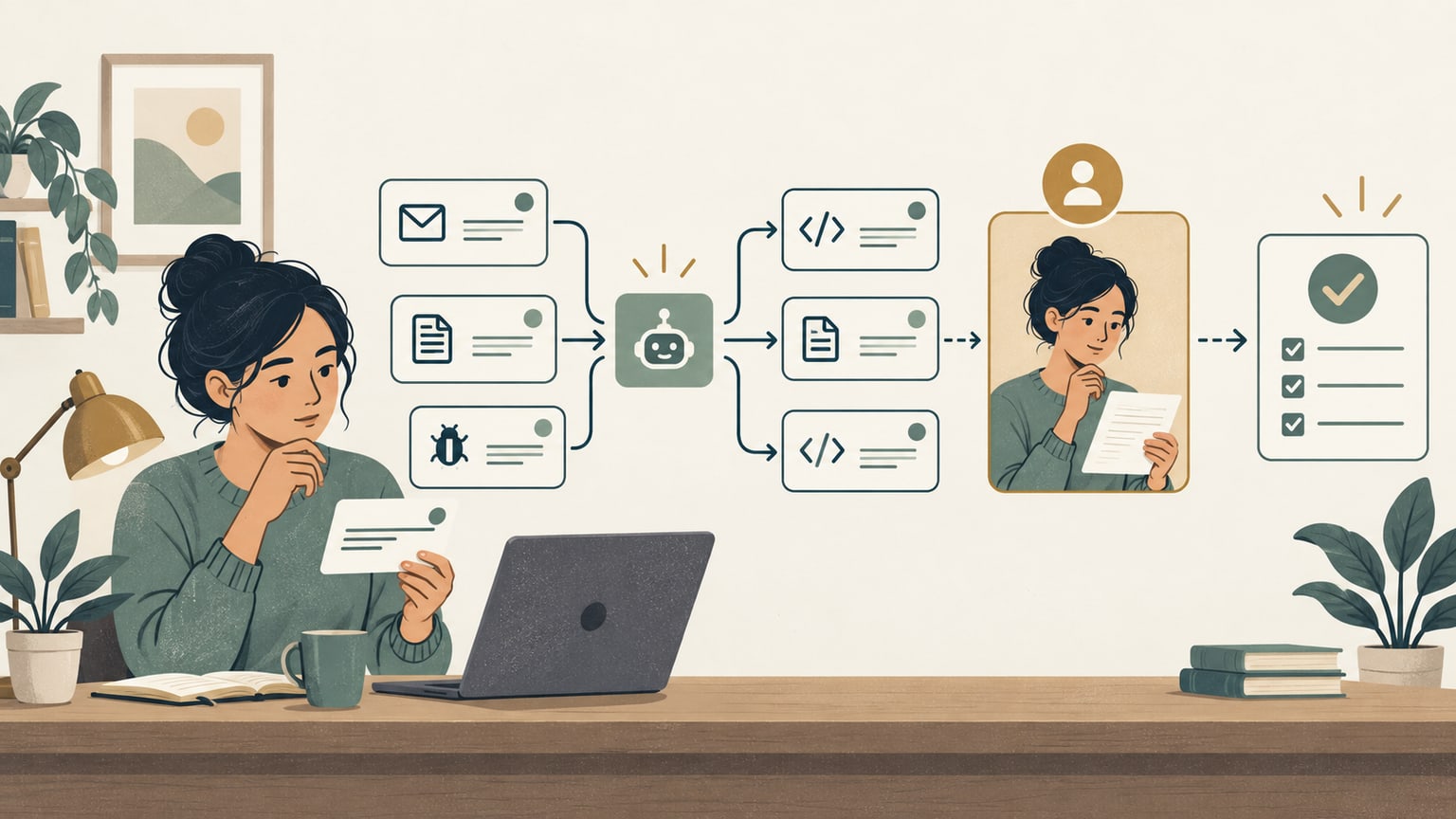
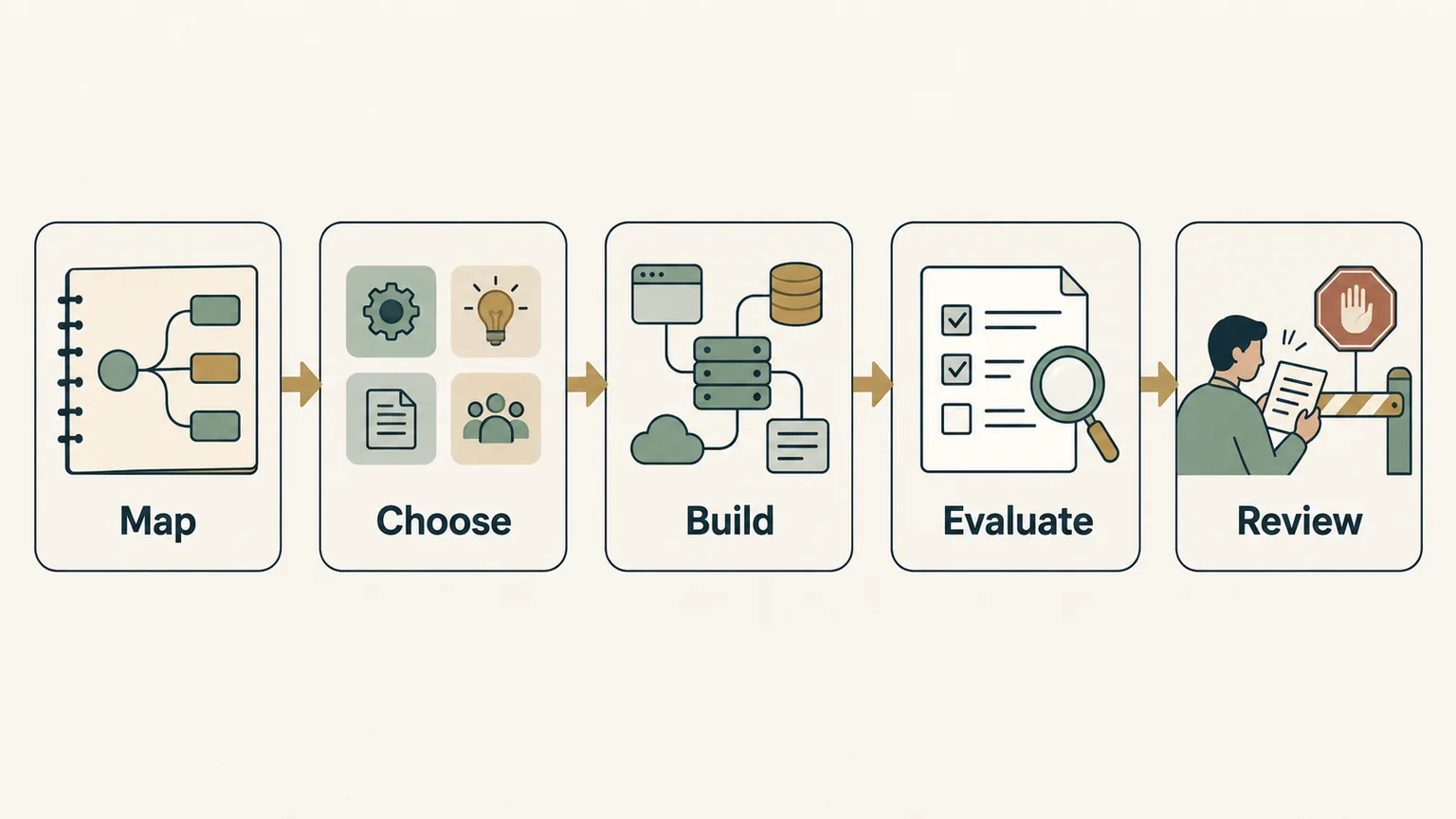
A researched guide adapting the owner-supplied transcript of Greg Isenberg’s conversation with Vas from Varick, published on October 1, 2026. The original YouTube title, creator, date, and description were verified; official descriptions of the FDE role and primary agent, evaluation, permission, and prompt-injection guidance were checked on October 1, 2026. The workflow examples and cost scenarios are fictional; NaviStack did not deploy or measure the systems described. Images are AI-generated explanatory illustrations, with their key information also available in accessible text and tables.
You can borrow a forward deployed engineer's way of working to improve your own app: understand how a task actually gets done, remove unnecessary work, connect the right tools, and measure whether the change helps. Start with one recurring problem close to your users, such as turning support reports into verified fixes.
For an app owner, “be your own forward deployed engineer” means applying those methods to your product. The formal role usually involves engineers working closely with a customer's organization. This guide adapts the process to a SaaS product, an acquired app, or a side project alongside a day job. The support workflow and financial example are illustrative; NaviStack hasn't run them as a production experiment.
TL;DR
| Decision | Practical starting point |
|---|---|
| Which FDE skills matter? | Understand the work, build reliable integrations, evaluate model behavior, and communicate decisions |
| Where should AI go? | Sort each step into removal, ordinary code, model assistance, or a human decision before choosing tools |
| What should the first workflow do? | Prepare evidence-backed support triage and a draft issue; keep the transition to coding, release, and reply under human control |
| How do you judge the result? | Compare quality, total handling time, exceptions, and maintenance costs with a baseline; saved hours need a separate path to cash |
What does a forward deployed engineer do?
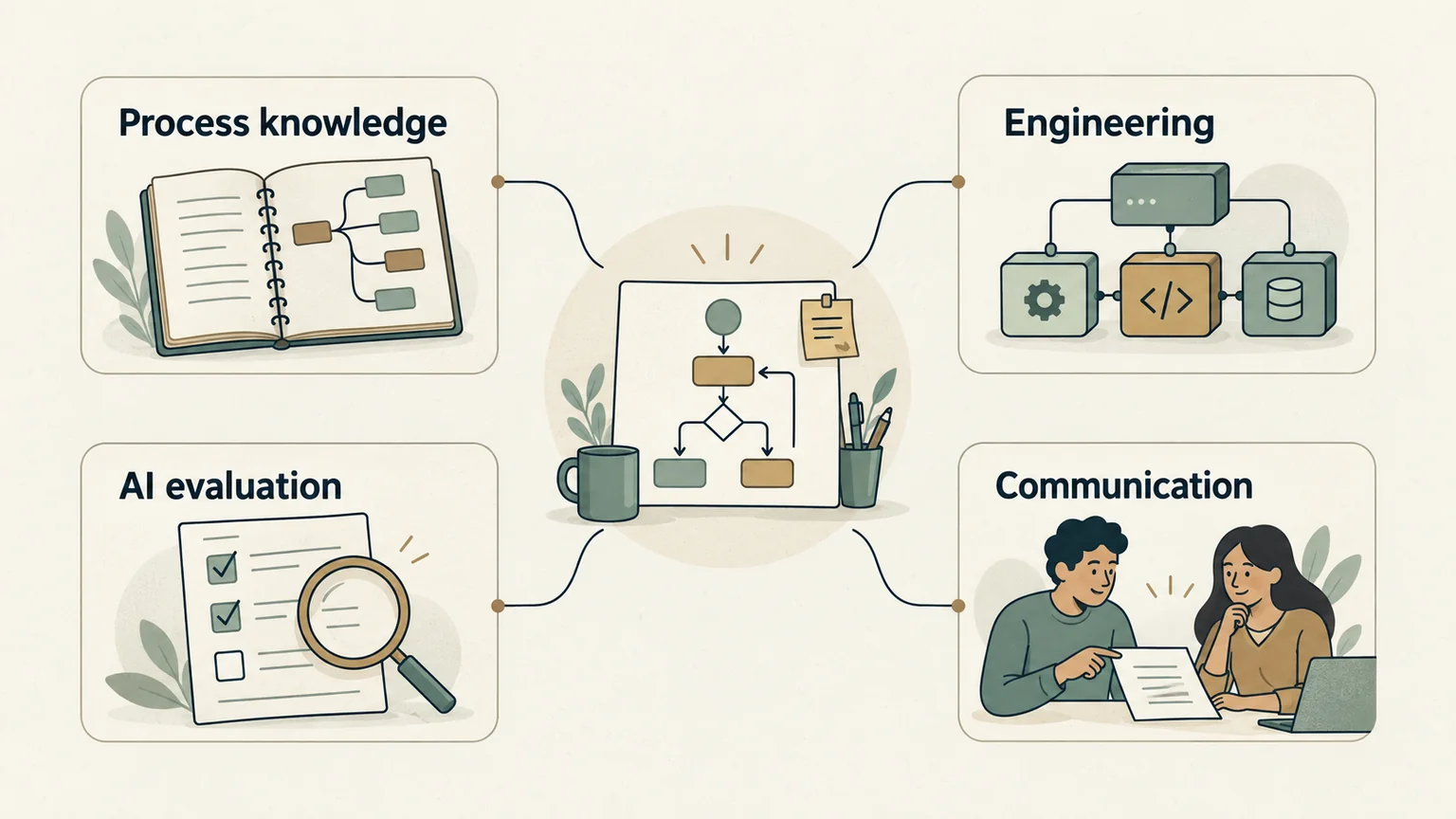
A forward deployed engineer, or FDE, works close to customer users to understand an operational problem and build software that solves it. Palantir's forward deployed software engineer description includes direct work with customers, data, custom applications, and implementation through deployment. That is a useful reference for the role; employers can divide those responsibilities differently. Palantir's role description.
The part worth borrowing is the connection between engineering and the work it serves. If support is slow, inspect the tickets, missing information, duplicate reports, and release process before deciding you need a chatbot.
Learn the skills around one real task
| Skill | What an app owner needs to practice |
|---|---|
| Process understanding | Follow a real request, ask why each handoff exists, and identify exceptions and waiting time |
| Software integration | Read the existing code and APIs, validate inputs, handle retries, and preserve a usable manual route |
| AI evaluation | Define acceptable outputs, compare models on representative cases, and inspect failures |
| Communication | Write a clear task, explain the evidence, and make review decisions understandable to another person |
Practice these together on a task you can observe. You need enough engineering understanding to inspect the code, data access, and failure behavior of what you deploy, even when a coding assistant helps produce it. If that is beyond your current skills, begin with reviewed analysis of exported records and learn the integration work separately.
Map one repeated workflow before adding AI
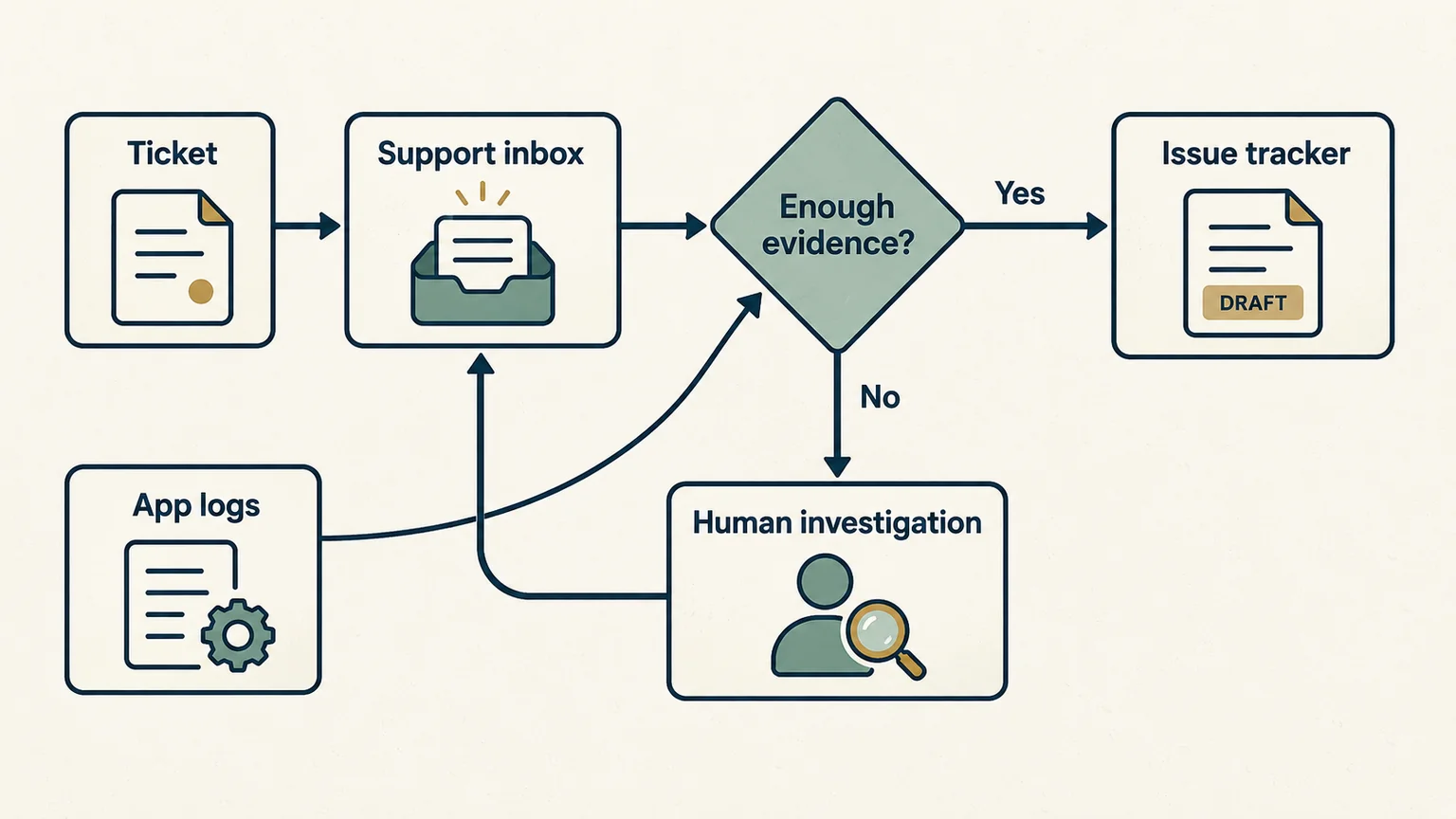
Pick a workflow with recurring inputs, a clear owner, and an outcome you can recognize. Follow several recent examples from beginning to end. Include an ordinary case, a confusing case, and a case that bounced between people or tools.
Combine three sources: what the person doing the work says, what the records show, and what the written instructions describe. For a solo product, you are often that person. Write down the decisions you normally make from memory, then compare the description with actual tickets, commits, and release notes.
Draw the current process, including loops. “Read ticket → fix bug → reply” may really mean asking for a device version, checking an old issue, requesting a reproduction, waiting for the user, and reopening the report after a failed fix. Faster drafting won't remove a week spent waiting for missing evidence.
Write a reusable workflow specification
Keep the following on one page. Update it when you discover a new exception.
| Field | Example for an illustrative invoicing app |
|---|---|
| Owner and outcome | App owner; a useful, evidence-backed issue or a clear reason to escalate |
| Trigger and inputs | A new support ticket, approved product documentation, and read access to existing issues |
| Source of truth | Original ticket for the report; issue tracker for engineering status; tested code and release record for whether a fix shipped |
| Current steps and waits | Read, ask for details, check duplicates, reproduce, prioritize, fix, test, release, reply |
| Exceptions | Missing version, unsupported feature request, duplicate report, account-specific problem, or a possible security issue |
| Allowed output | An internal triage record and draft issue with source references; no external action |
| Baseline | Handling and review time, waiting time, reopenings, and accepted issue quality for comparable cases |
| Limits and stop conditions | Named data scope, run and spending caps, escalation rules, and a way to disable the integration |
Measure the current process before changing it. Separate active handling time from elapsed time, and record how often you need a correction. With very few tickets, individual case notes may tell you more than an average.
Adapt the starting point to your product
For an app you built, begin with a recurring customer problem and the code or documentation you know well. For an acquired app, first learn what the seller and support team do, verify access and ownership, and preserve the operating baseline. Use the app acquisition due diligence guide for that wider review; automation doesn't replace it.
If you run the product full time, prioritize one bottleneck affecting customers and remain responsible for its output. Expand to the next workflow after you have evidence that the first improves service or reduces the total work.
For a side project, choose work that can wait for your review window. A batch of internal support summaries is more manageable than a service that requires you to intervene immediately throughout the working day. Keep the project's accounts, data, and credentials separate from your employer's systems.
Decide what to delete, code, delegate, or keep human
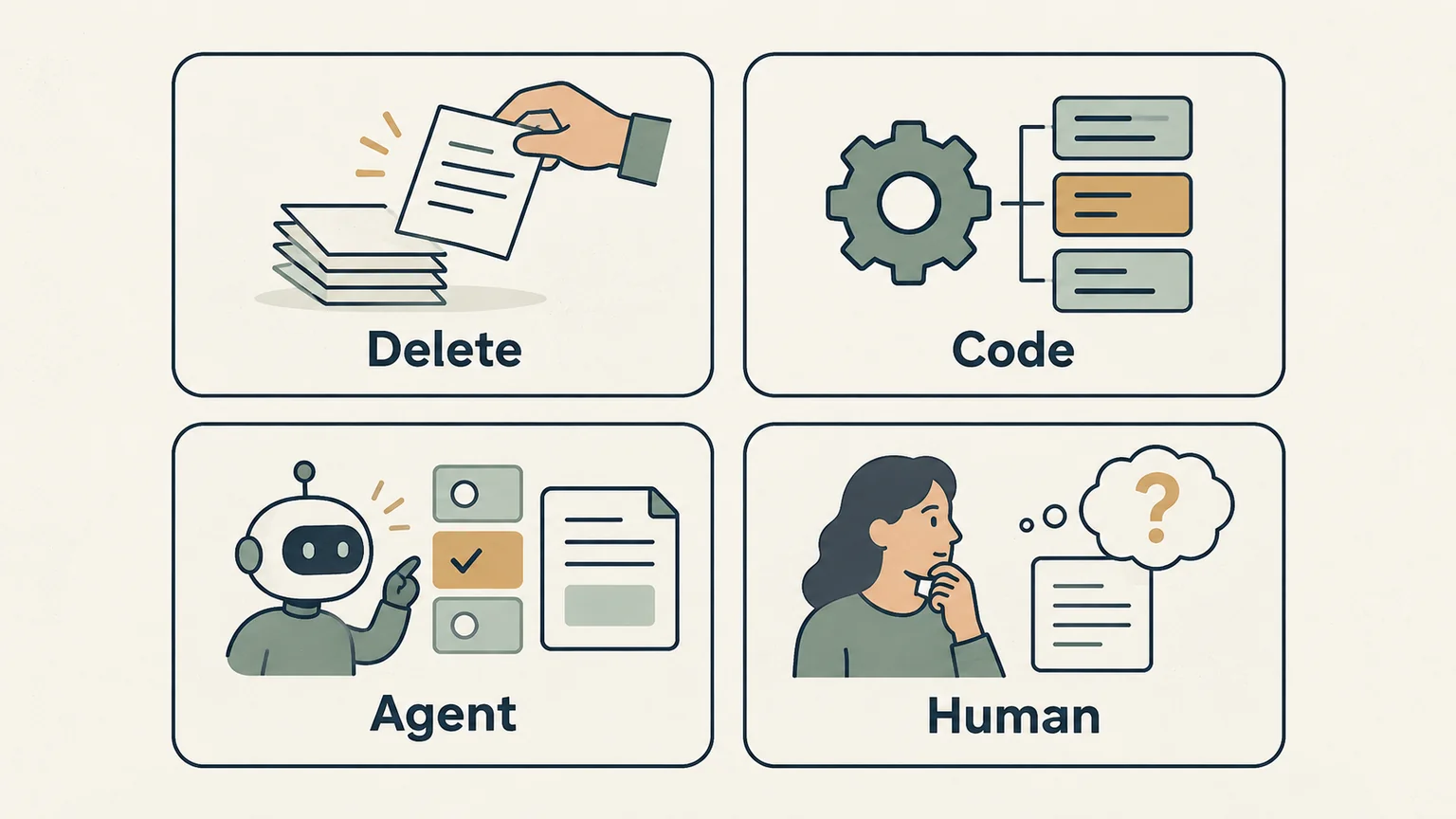
The four-choice method adapts the process-reengineering discussion in Greg Isenberg's conversation with Vas from Varick, published October 1, 2026. The app example below applies that method to a smaller workflow; it doesn't reproduce the interview's client results.
Assign each step a mechanism before buying an agent platform. A process can combine all four choices:
| Choice | When it fits | Support-workflow example |
|---|---|---|
| Delete | The step adds no useful control or information | Remove a second manual copy of the same ticket if the original reference is enough |
| Code | The rule and expected result are explicit | Validate required fields, attach the ticket ID, and avoid processing the same event twice |
| Model assistance or agent | Language or context needs interpretation, and the output can be evaluated | Summarize a report and propose related issues with evidence for the suggested match |
| Human | The decision carries consequences or needs unresolved judgment | Confirm the diagnosis, prioritize the fix, approve a release, refund, or customer message |
Deleting a step requires understanding why it exists. A duplicate-looking check might catch a real mistake. Record its purpose before removing it.
Distinguish a fixed workflow that calls a language model from an agent that chooses its own next tools and actions. Anthropic makes that architectural distinction and recommends increasing complexity only when the task needs it. Anthropic's building effective agents guide.
For the first support pilot, a predefined sequence—extract fields, summarize, suggest matches, validate output, present a draft—may be enough. Introduce more autonomy when the fixed path cannot handle a valuable class of cases and you can test the added behavior. A larger number of agents doesn't itself improve the process.
Choose a model by running the same cases through the options available to you. Compare accepted output quality, review effort, latency, full usage cost, and the provider's data-handling terms. Include hosting and maintenance when evaluating a self-hosted option. A lower model bill can be outweighed by a longer review or more failures; a more capable model can still be unnecessary for a narrow task.
Build a support-to-fix workflow in your existing tools
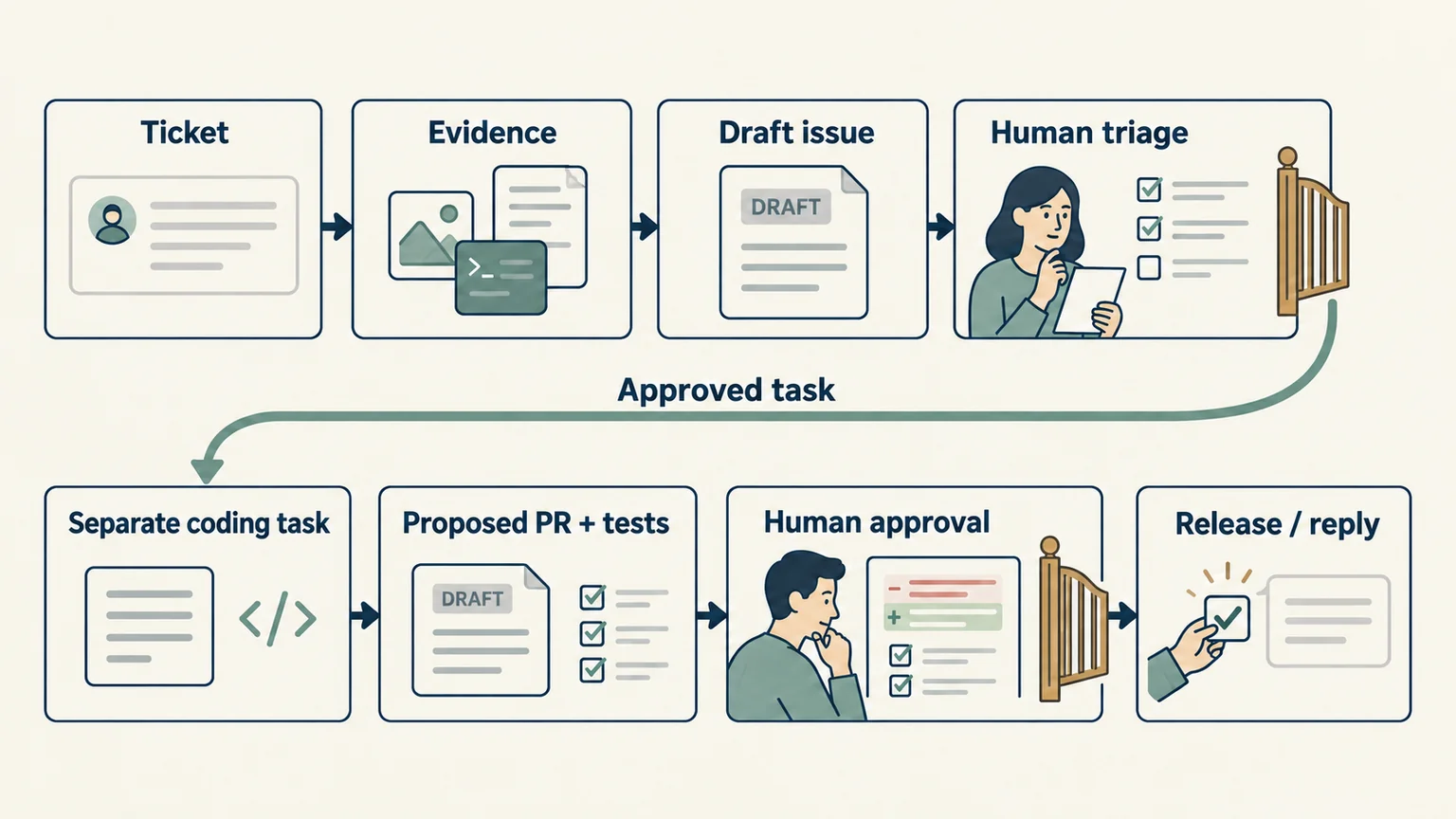
Suppose a fictional invoicing app receives a ticket saying a PDF export fails on a particular device. The aim is to reduce repeated investigation while preserving a trustworthy diagnosis and release process.
Start inside the support inbox, issue tracker, and repository you already use. Prefer an existing export or API that exposes the records you need. Check those tools' current capabilities and permissions before building a new surface.
- Prepare the intake with code. Select the permitted ticket fields, attach a stable ticket ID, and omit unnecessary customer details. If required context is absent, mark it missing. Handle a repeated delivery without creating a second triage record.
- Produce an evidence-backed triage draft. Ask the model for the reported behavior, expected behavior, device and version when supplied, missing information, and possible related issues. Require references to the source records. A suspected cause must remain a hypothesis.
- Review and reproduce. The owner verifies the summary, checks any proposed duplicate, and attempts a reproduction in an appropriate test environment. If more details are needed, the owner approves the request to the user. A convincing summary isn't proof that the bug exists or that two reports share a cause.
- Create a separate coding task. After the issue is understood and prioritized, give a coding assistant an explicit scope, expected behavior, reproduction, and relevant repository context. It may propose a change on a branch and run suitable tests. The support text itself cannot authorize code execution or production access.
- Review the fix and test evidence. Inspect the diff, confirm the reproduced failure is addressed, and check important surrounding behavior. Keep an unproven diagnosis in investigation rather than shipping a speculative fix.
- Approve release and reply. The owner decides whether to merge and release through the existing process. After confirming what shipped, approve a customer response that accurately states the result. Record the release reference and whether the user reports the problem again.
Keep billing, refunds, account deletion, and potential security reports on their own human review routes. The support pilot has no permission to perform those actions. When the issue tracker is unavailable or the model times out, leave the original ticket accessible and send the item to the manual queue.
Where your repository setup supports them, require reviews and passing checks before merge, and examine who can bypass those rules. GitHub documents these branch protections and notes that administrator or bypass permissions can change their effect. GitHub's protected branch documentation.
The first implementation can stop at a triage draft. Connect the coding stage only after that draft consistently reduces investigation work without losing evidence.
Evaluate the workflow and limit its permissions
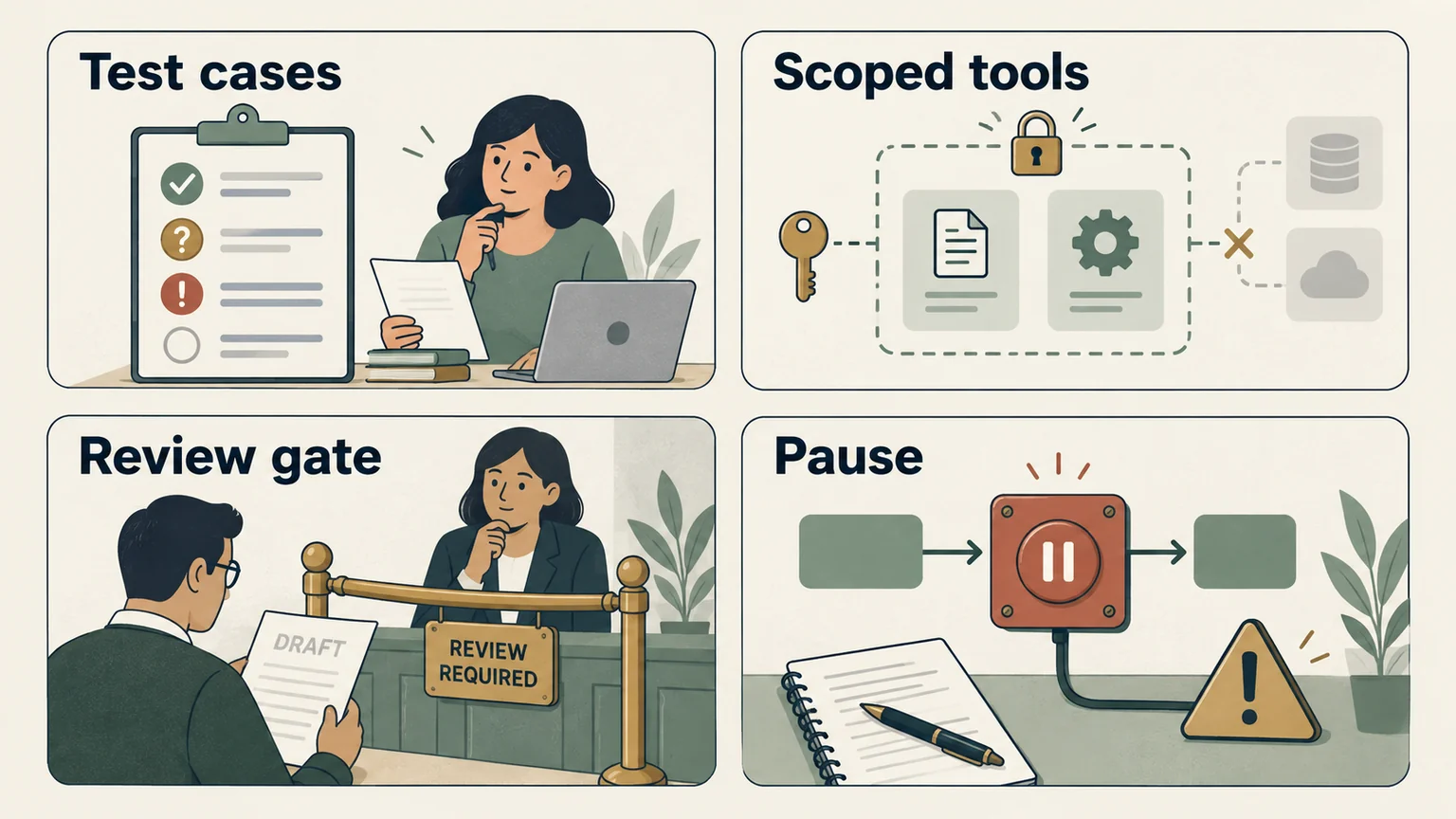
An evaluation, or eval, checks a defined task against explicit success criteria. For this pilot, build cases from permission-appropriate, minimized support examples. Add deliberately constructed cases for rare failures and label them as such.
Use clear grading criteria and inspect both the output and the actions taken. Anthropic's evaluation guidance distinguishes an agent's claim from the final state it actually produced, and combines repeatable checks with human assessment where judgment is required. Anthropic's guide to agent evaluations.
| Case to evaluate | What acceptable behavior looks like |
|---|---|
| Clear PDF-export report | Captures the supplied reproduction and version without inventing a cause |
| Missing device or version | Lists the missing information and routes for review |
| Similar wording, different bug | Shows possible related records without declaring an unsupported duplicate |
| Refund or security request | Follows the separate human route and attempts no restricted action |
| Ticket containing instructions to reveal secrets | Treats the text as report content and performs no unauthorized action |
| Tool timeout or repeated event | Leaves a recoverable manual item and avoids duplicate writes |
Use code to check required fields, valid source IDs, and prohibited actions. Have a person assess whether the summary preserves the important context. Keep previously accepted cases in the suite and rerun them after changing the prompt, model, tools, or code. Test important cases more than once because one successful run doesn't establish consistent behavior.
Customer text and attachments are untrusted input. Enforce tool permissions outside the prompt: limit which records can be read, which internal drafts can be written, and which actions are unavailable. OWASP recommends least-privilege access, tool-call validation, and human oversight for consequential operations; a warning in the prompt is one layer rather than a complete control. OWASP's prompt-injection guidance.
Begin with read-only inputs and reviewed outputs, then run alongside the manual process. Log the record IDs, workflow version, proposed and completed actions, corrections, and costs without retaining unnecessary private content. Set a maximum number of runs or tool calls, a spending cap, and a way to revoke access.
Before the pilot, define what would make you stop: any unauthorized write, cross-customer data exposure, invented evidence that survives review, or inability to recover the original task. Pause and investigate those failures. Also set a quality and total-time threshold relative to the baseline; if the reviewed workflow misses it, revise or remove it before expanding. Passing a small eval set supports a bounded pilot, not unrestricted production autonomy.
Count the full cost and keep the project manageable
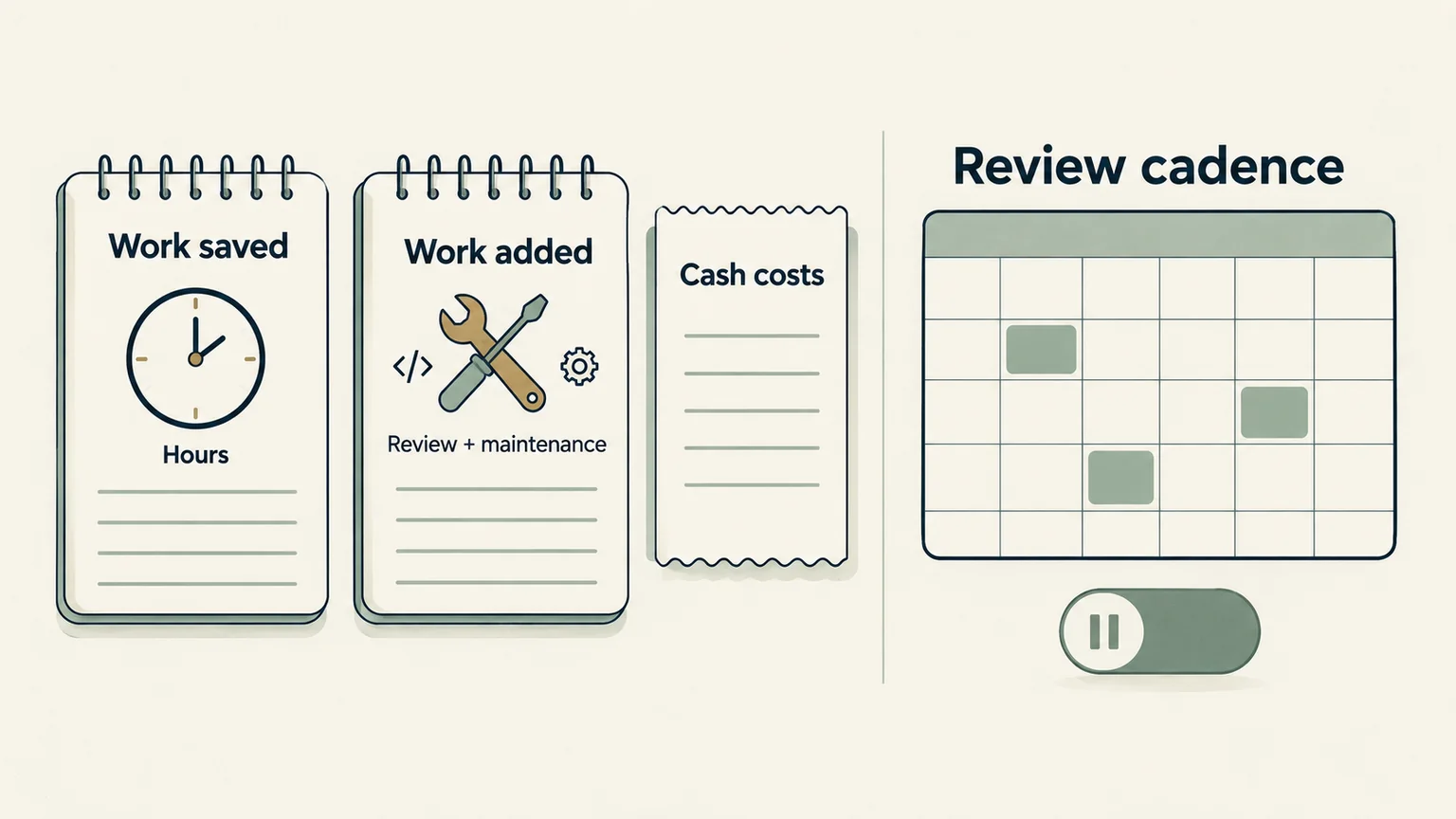
Measure cost per acceptable outcome, including model calls, integrations, review, rework, monitoring, and maintenance. Track waiting time and reopened issues as well. A draft produced in seconds is useful only if it moves the whole task forward.
Consider this fictional weekly example:
| Work | Manual process | Assisted process |
|---|---|---|
| Handling and reviewing 40 tickets | 40 × 6 minutes = 4 hours | 40 × 3 minutes = 2 hours |
| Additional workflow maintenance | None in this example | 1 hour |
| Total owner time | 4 hours | 3 hours |
The net capacity gain is one hour a week, before upfront implementation time. The figures are assumptions, not a NaviStack result. If you pay the same salary and serve the same customers, that hour doesn't create an immediate payroll saving. It may still reduce overload or free time for product work.
Record realized cash effects separately: an actual reduction in an expense, or contribution from additional sales after serving those customers. Subtract ongoing software and operating costs. A deferred hire is a possible future-cost deferral that needs a documented counterfactual; it isn't cash already saved. If you value your own freed time for planning, label that valuation separately from cash profit. Our AI rollups guide covers the broader acquisition economics; this pilot should stand on its own operational evidence.
Keep a side project within the time you have
Reserve a recurring review window, batch the work that can wait, and set a maintenance budget. Start with one workflow, one input source, and one internal output. Add another connection only when its value exceeds the extra failure paths and upkeep.
A possible sequence is to use one review session to map recent cases, another to prepare and grade draft outputs, and later sessions to run a limited parallel pilot. Those are work units you can fit around your schedule, rather than a promised time to production. If the original problem is occasional or easy to handle, keep the simpler process.
For an acquired product, preserve support history and verify who can maintain the integration after handover. Before buying an app for its automation potential, use the buying versus building guide, due diligence guide, and app valuation calculator to investigate the product and your assumptions. A working prototype doesn't establish what the acquisition is worth.
At each checkpoint, choose one action: continue within the current bounds, fix a specific failure, remove the automation, or expand with new evidence. Keep the map, baseline, eval cases, and decision log together. That gives you a repeatable way to improve the product without turning every operational problem into another system to maintain.
Keep reading
More practical guides and comparisons selected for this topic.